
Offer link
You know when the client opened your offer.
You send a link instead of a PDF. The client adjusts the options, sees the new price and clicks “I accept the offer”. The status updates itself.
SentViewed 2×Accepted
Sales, team, projects and communication in one AI-assisted system
From the morning you know who to call and who has just opened your offer, and after every call the panel suggests what to do next. You pay a low subscription for the whole company, not per seat, and SMS, calls and AI features are billed by actual usage.
No card required. Data stored in the European Union.
Offer link
You send a link instead of a PDF. The client adjusts the options, sees the new price and clicks “I accept the offer”. The status updates itself.
From lead to project
Tasks, a Gantt chart and time tracking are set up for the same client. The project manager takes over with the full history, not a single email.
Priced per company
No per-seat or per-module fees: the subscription covers the whole company and every module. SMS, calls and AI features are billed by usage, with a spending limit you set yourself.
Ecosystem
Phone, JSON Meet meetings, offers, call analysis and CRM work together. Chat, files, projects and HR live in the same system, behind one login and for one price.
One client's journey
 JSON Hubone client history
How you work
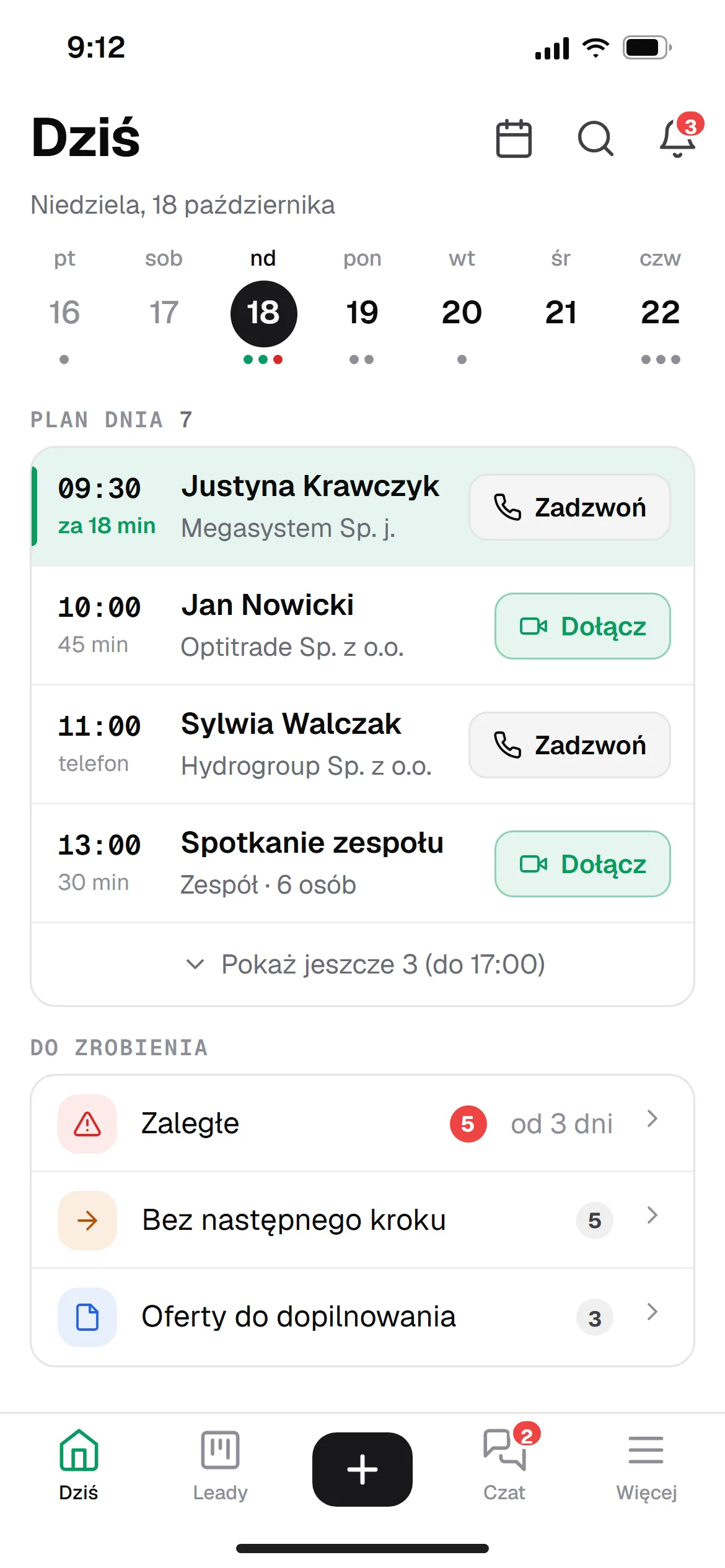
Seven moments from a salesperson's day, each on a real panel screen. For each one you can see the habit the panel builds.
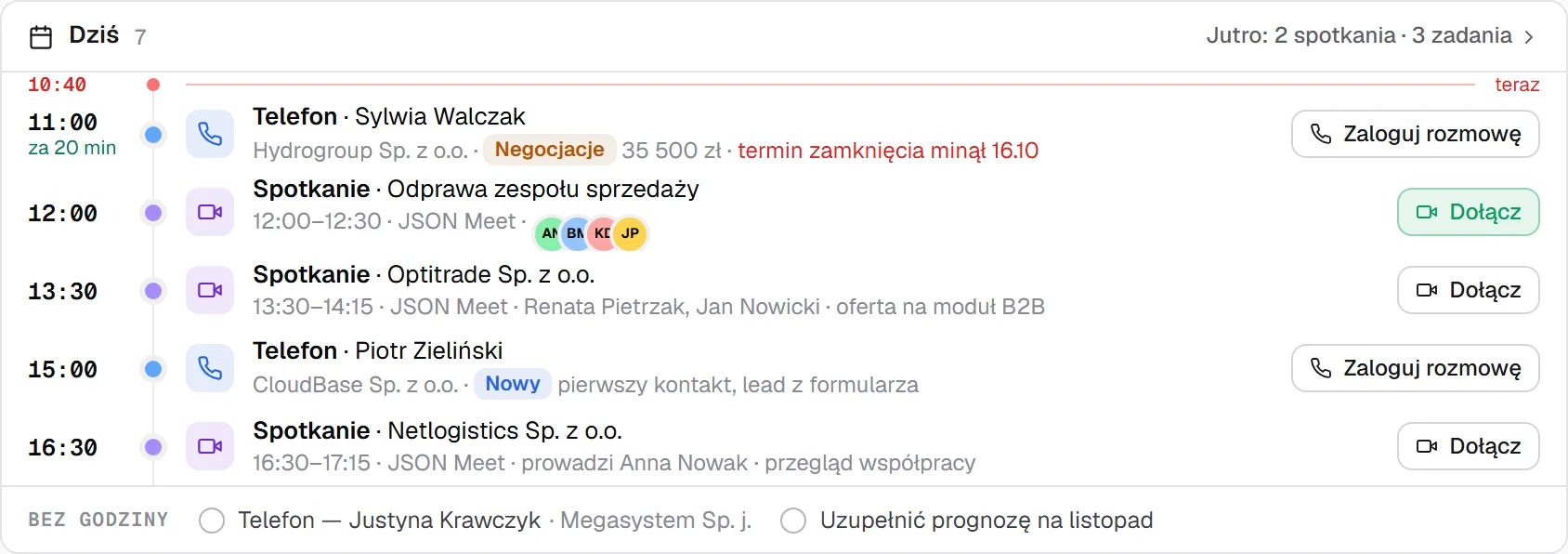
The habit it builds
Start the day with the conversations that move sales forward. Calls and meetings are ordered by time, with “Log call” and “Join” right next to them.
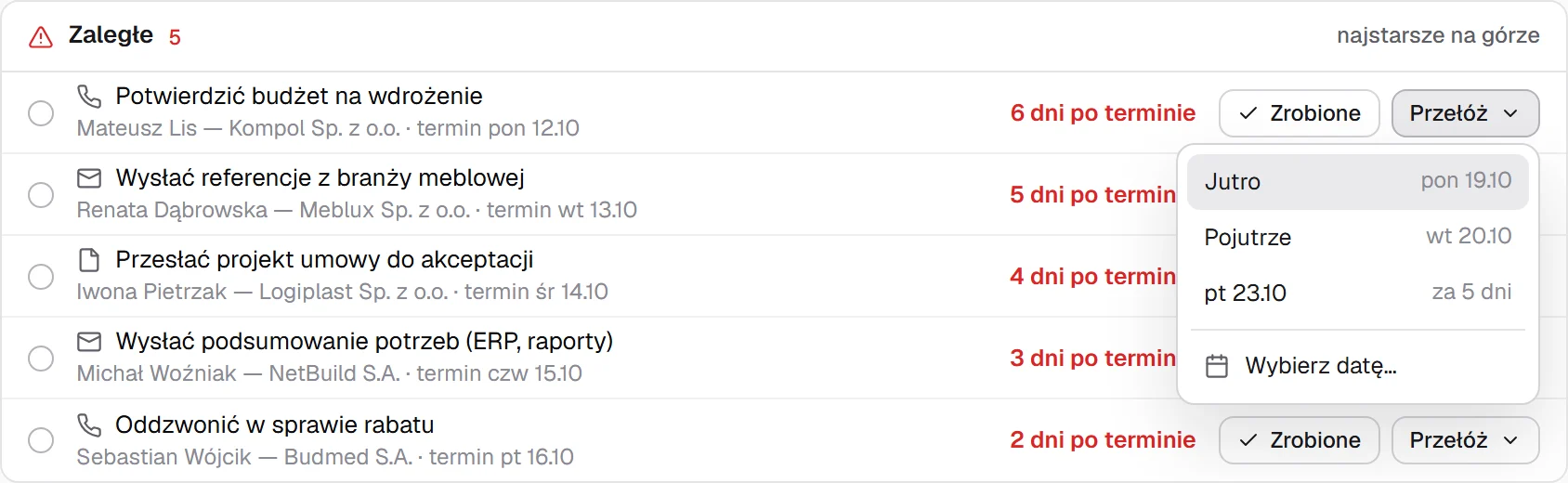
The habit it builds
Close overdue tasks straight away instead of carrying them around in your head. The oldest are on top, with “Done” and “Reschedule” in the same row.
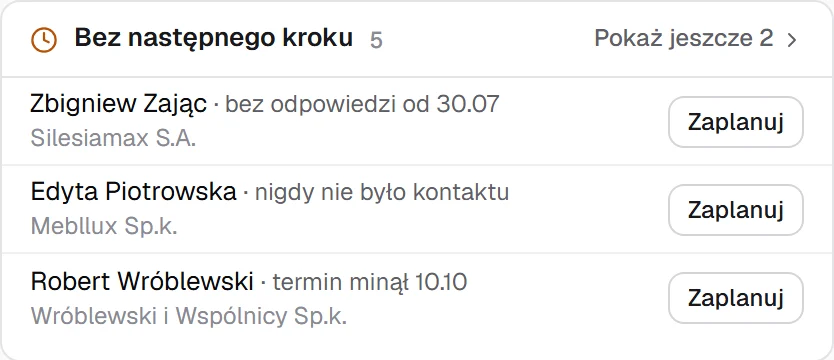
The habit it builds
Never leave a lead without a plan. The “No next step” list shows who needs scheduling, with the “Schedule” button right next to the name.
The habit it builds
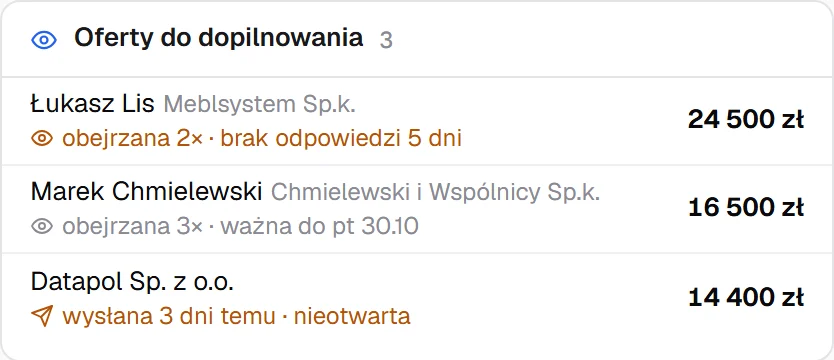
Call at the right moment. “Viewed 2×, no reply for 5 days” shows who keeps returning to the offer and is waiting for your move.
The habit it builds
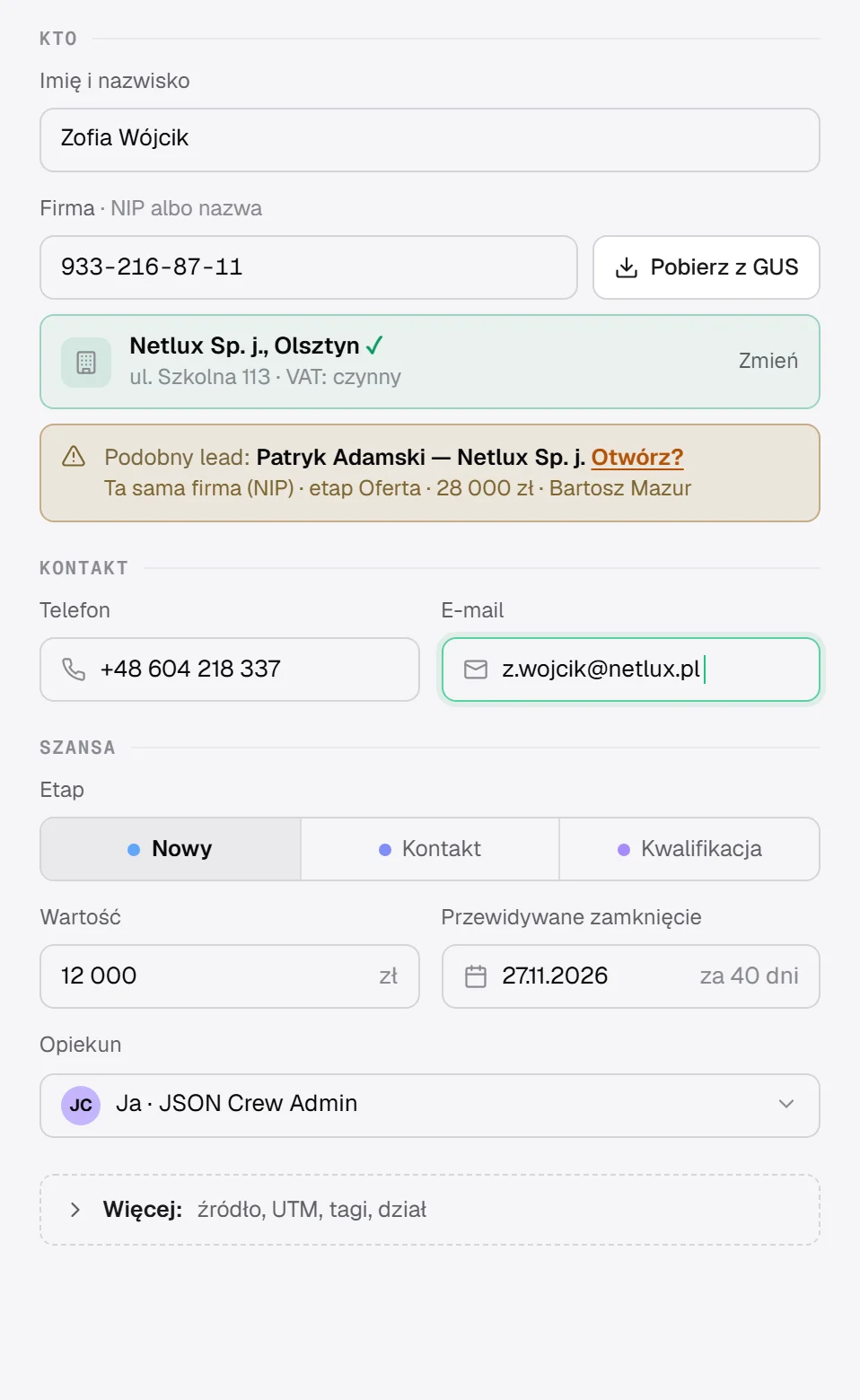
Add leads right away, not “later”. Enter the tax ID, the company details come from the official registry, and the panel warns you if the company is already in the CRM.
The habit it builds
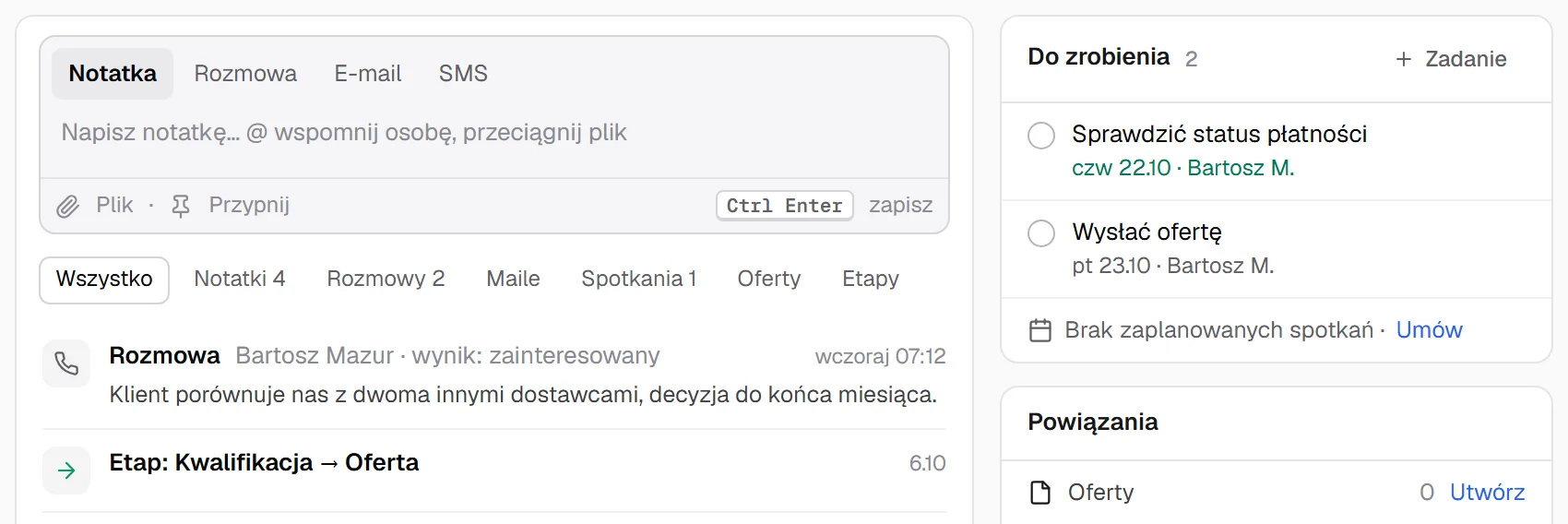
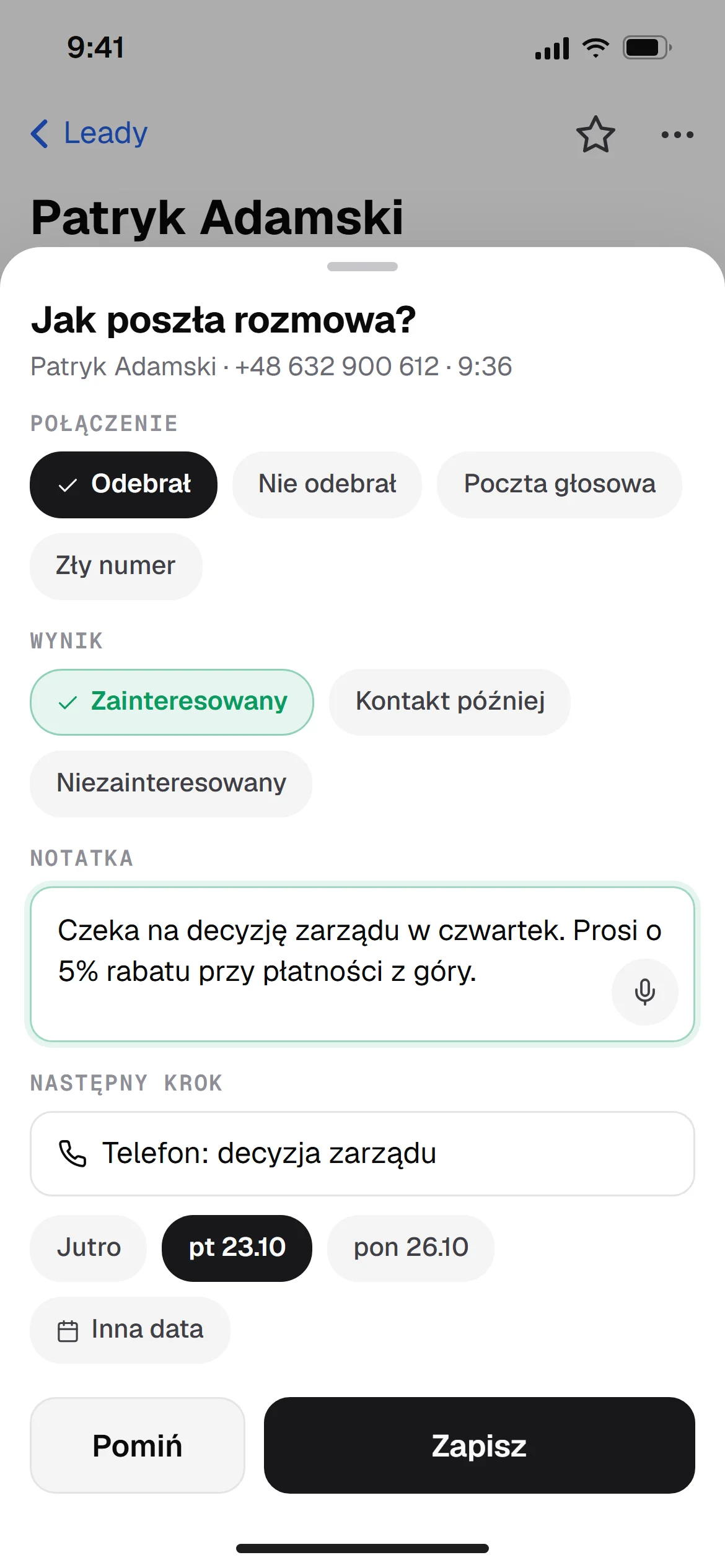
Log the outcome while the call is still fresh. The outcome and note go onto the lead timeline, and the next dated contact shows up in “To do” straight away.
The habit it builds
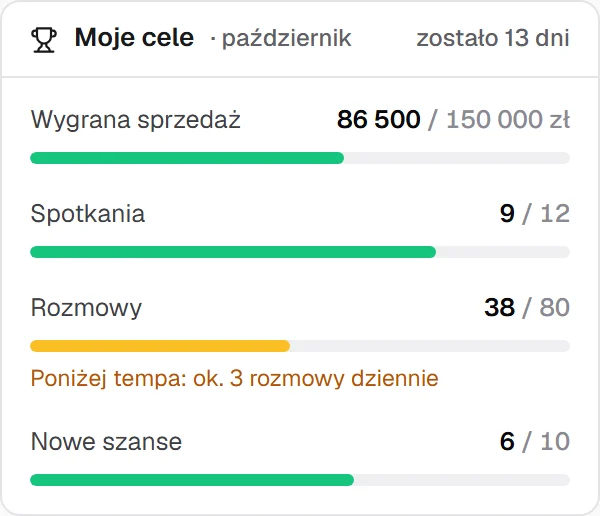
Watch your pace, not just the end-of-month result. “Behind pace: about 3 calls a day” tells you how much it takes to get there.
The best way to check is on your own data.
One panel
Leads, pipeline, offers, forecast, calendar, projects and team all use the same client data. Pick a view to see the screen with sample data.
“Summarise the sales status” turns calls and correspondence into the client's sentiment, risks and next steps. The agent next to the card drafts a follow-up or a task, and you approve it. Below it sits the full history: calls, notes, emails, SMS and offers on a single timeline.
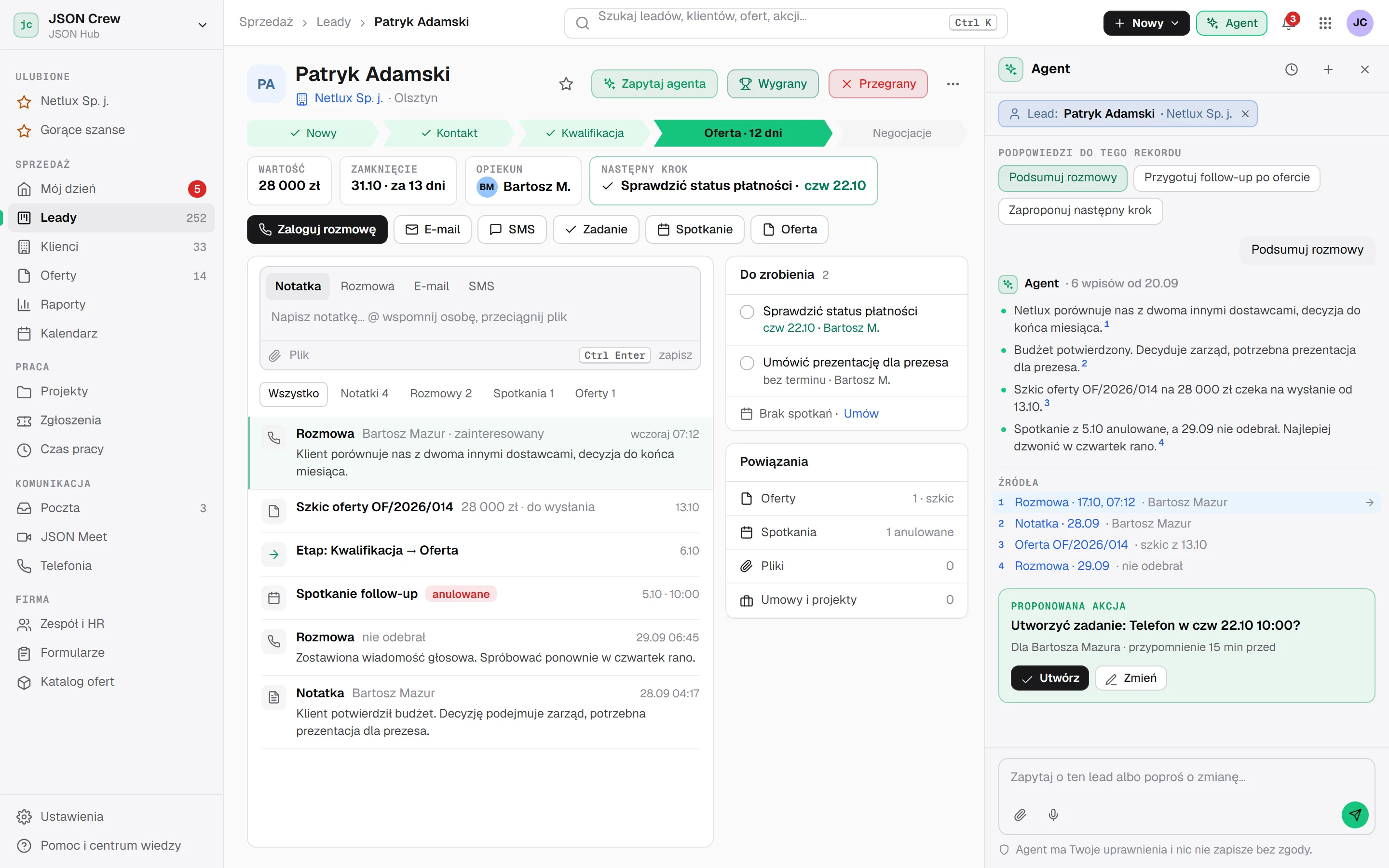
Swipe the screenshot sideways to see the whole screen.
Each stage shows the total and the value weighted by win probability. A card with no activity for 14 days gets a red marker, so no deal is left unattended.
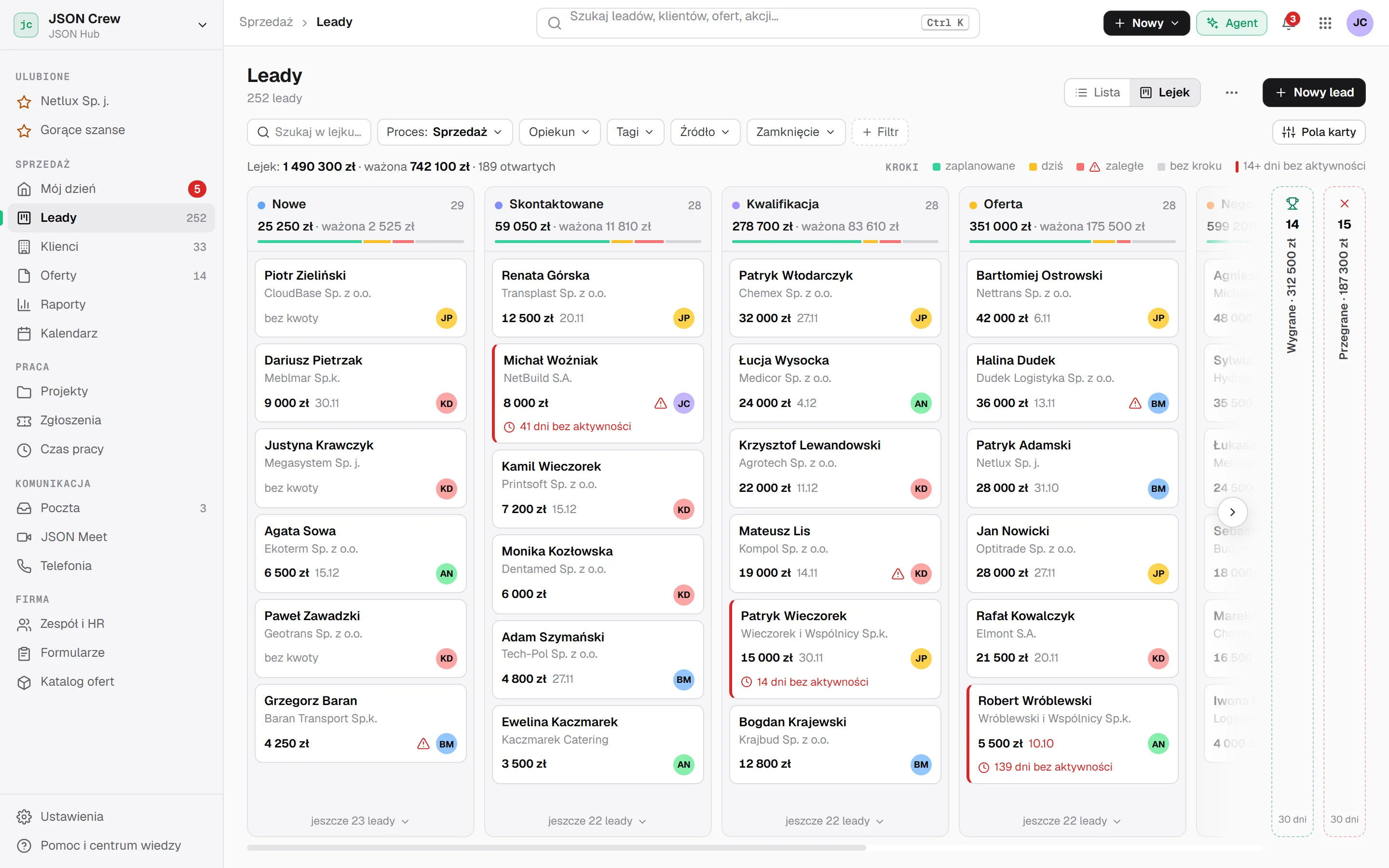
Swipe the screenshot sideways to see the whole screen.
You see how many times and when the client opened the offer. From the row menu you can extend validity, duplicate the offer or download a PDF.
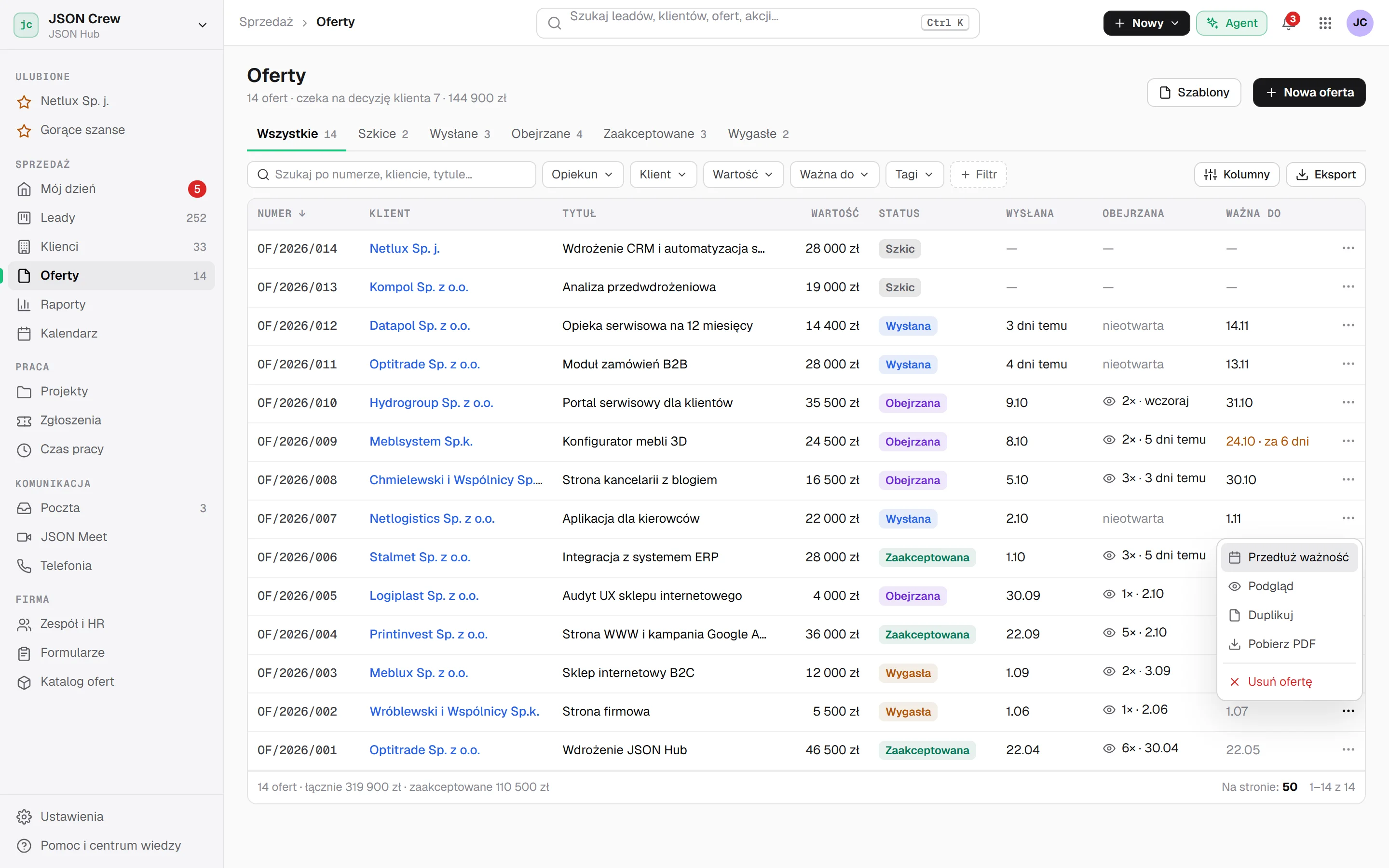
Swipe the screenshot sideways to see the whole screen.
Open deals by closing month, total and weighted value, compared with the previous period. Overdue deals stand out immediately.
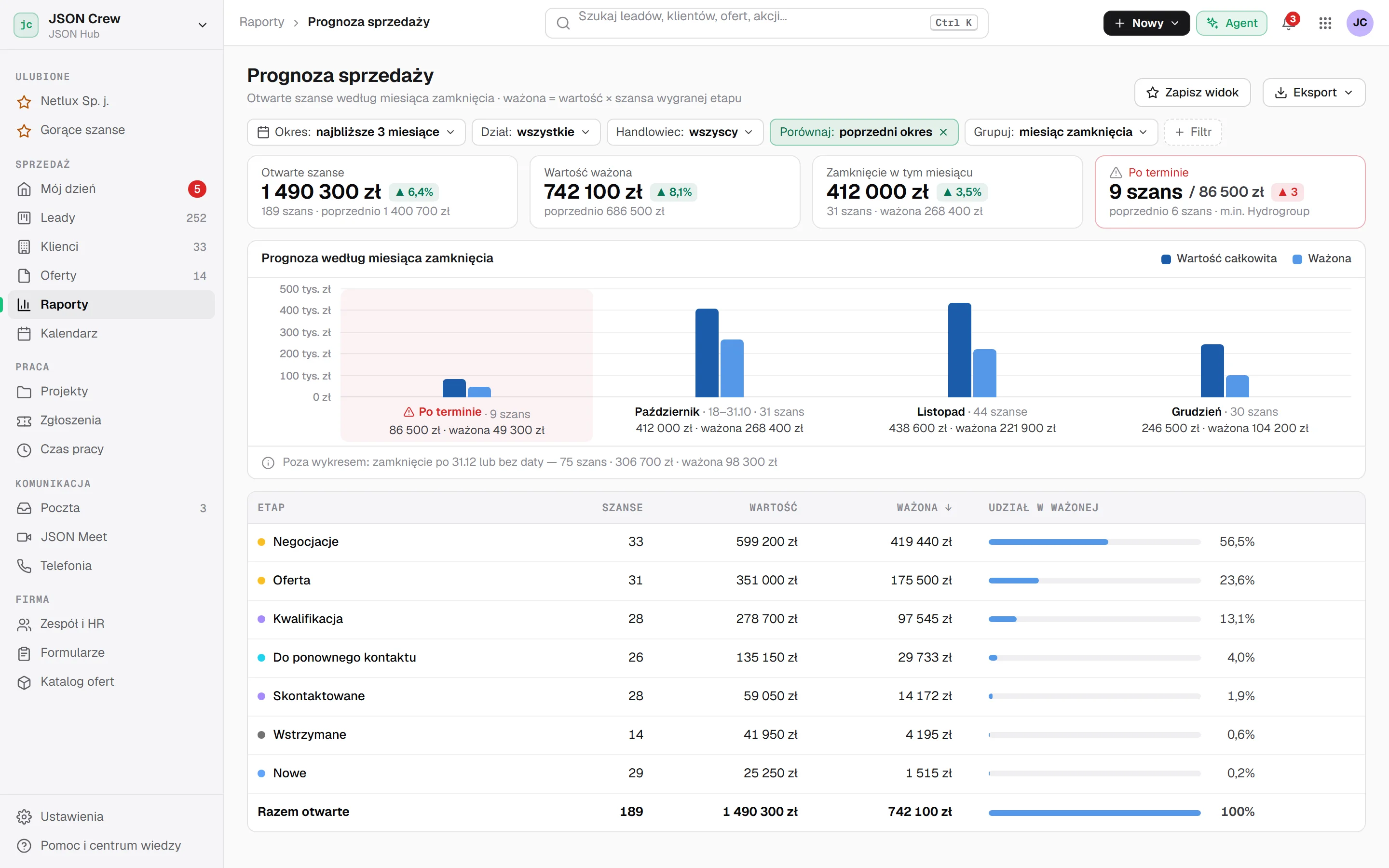
Swipe the screenshot sideways to see the whole screen.
The sales team's week, colour-coded by person: JSON Meet meetings, calls and daily tasks in one view. Connect it with Google Calendar.
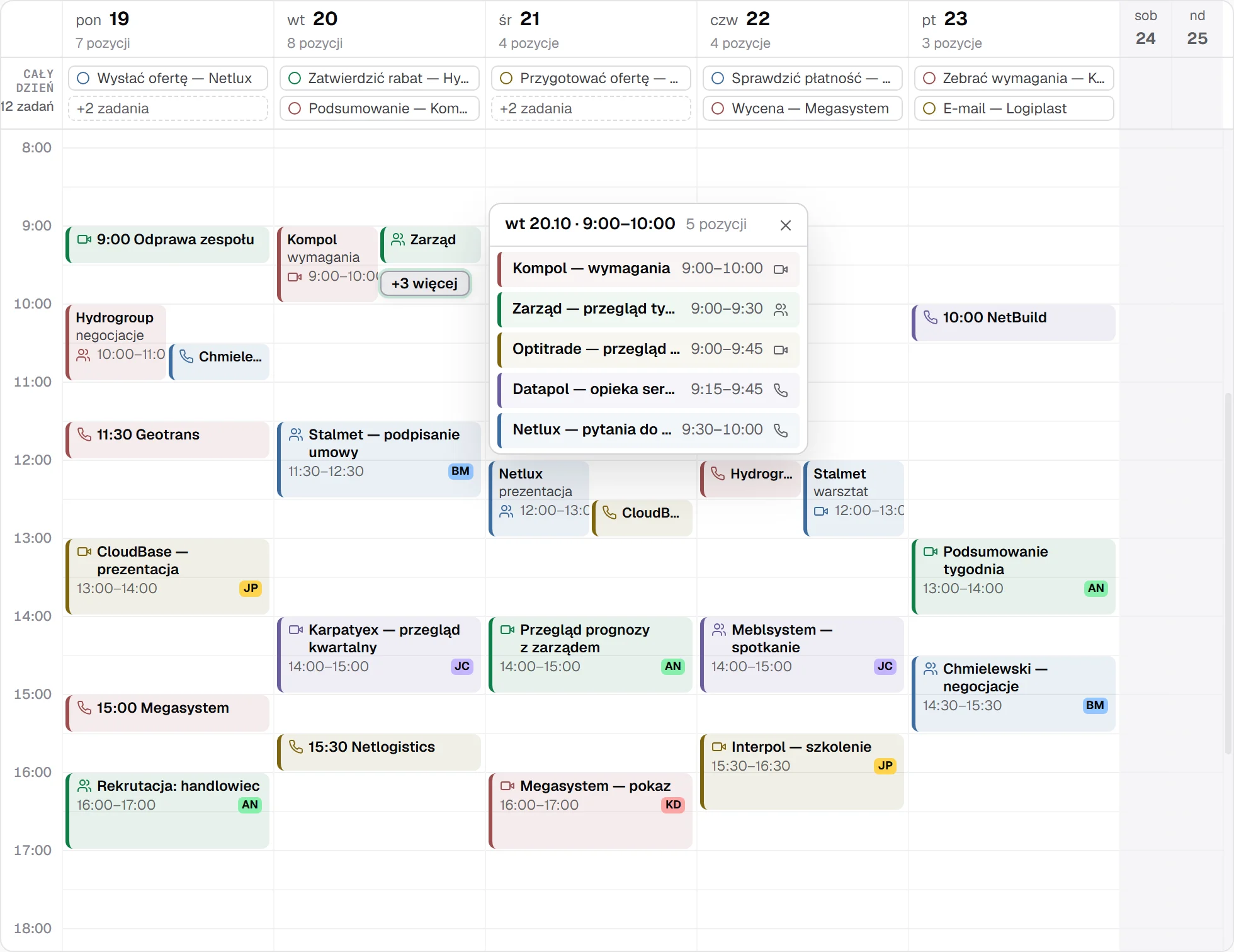
Swipe the screenshot sideways to see the whole week.
A project board from contracting to client sign-off. Budget next to hours used, with the deadline and project manager on every card.
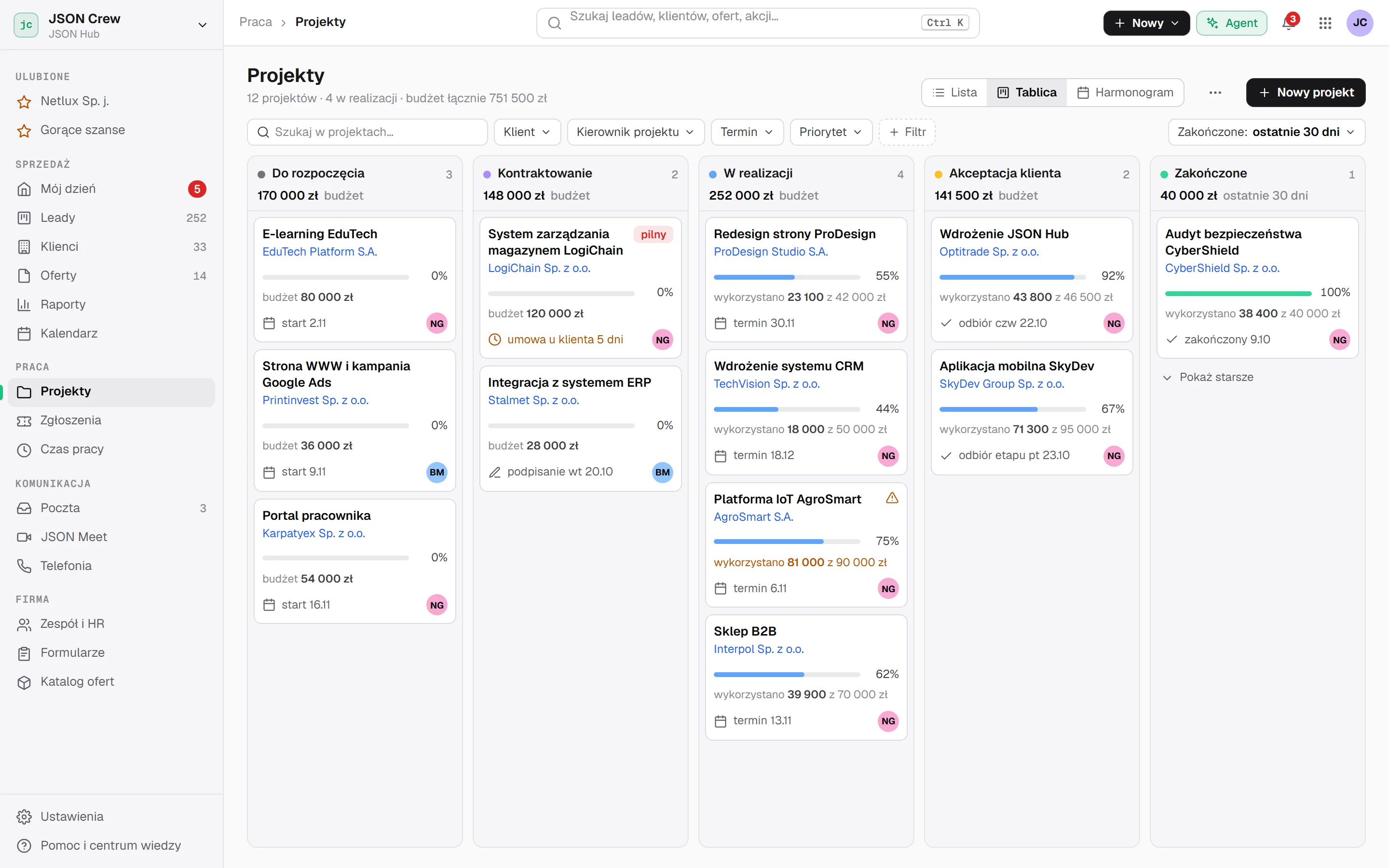
Swipe the screenshot sideways to see the whole screen.
Employees, departments and leave requests approved by managers. Remaining leave days are visible in a single row.
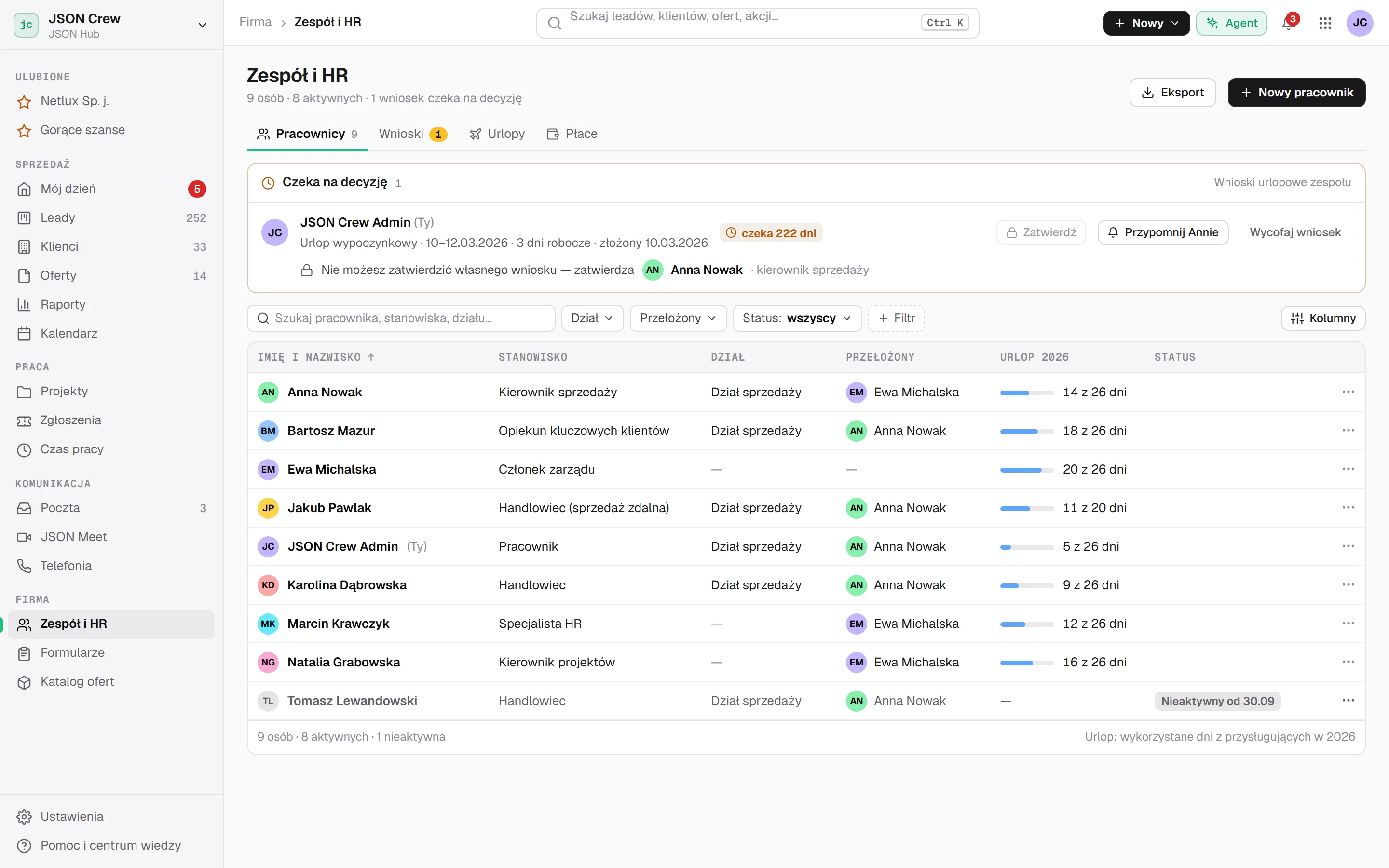
Swipe the screenshot sideways to see the whole screen.
Open the same screens on your own data.
Offer link
You send a link instead of a PDF. The client opens the offer without creating an account, changes options in the calculator and sees the new price straight away. At the end they click “I accept the offer”.
You get a notification in the panel and an e-mail saying “Your offer has been viewed”, and the status updates by itself. You call exactly when the client comes back to the offer.
Example: in a 12-person agency, an offer built from a ready-made catalogue takes 5 minutes, not two hours of working on a file.
Sales offer for Netlux Sp. j.
Prepared by Bartosz Mazur · valid until 14.11.202627 days left
Offer accepted. JSON Crew has been notified.
A sample offer. Change the scope and click “I accept the offer” to see what happens on your side.
CRM implementation and sales automation
Link and PDF sent to p.adamski@netlux.pl
First view. Notification in the panel and an e-mail to Bartosz
After the presentation. A second unique visitor
The client clicked “I accept the offer”. Time to set up the project
You’ll send your first offer link on day one.
Agent
5 leads have no next step. Waiting the longest:
Plan · 1 stepwaiting for you
Sample data. Click another example or the microphone.
AI
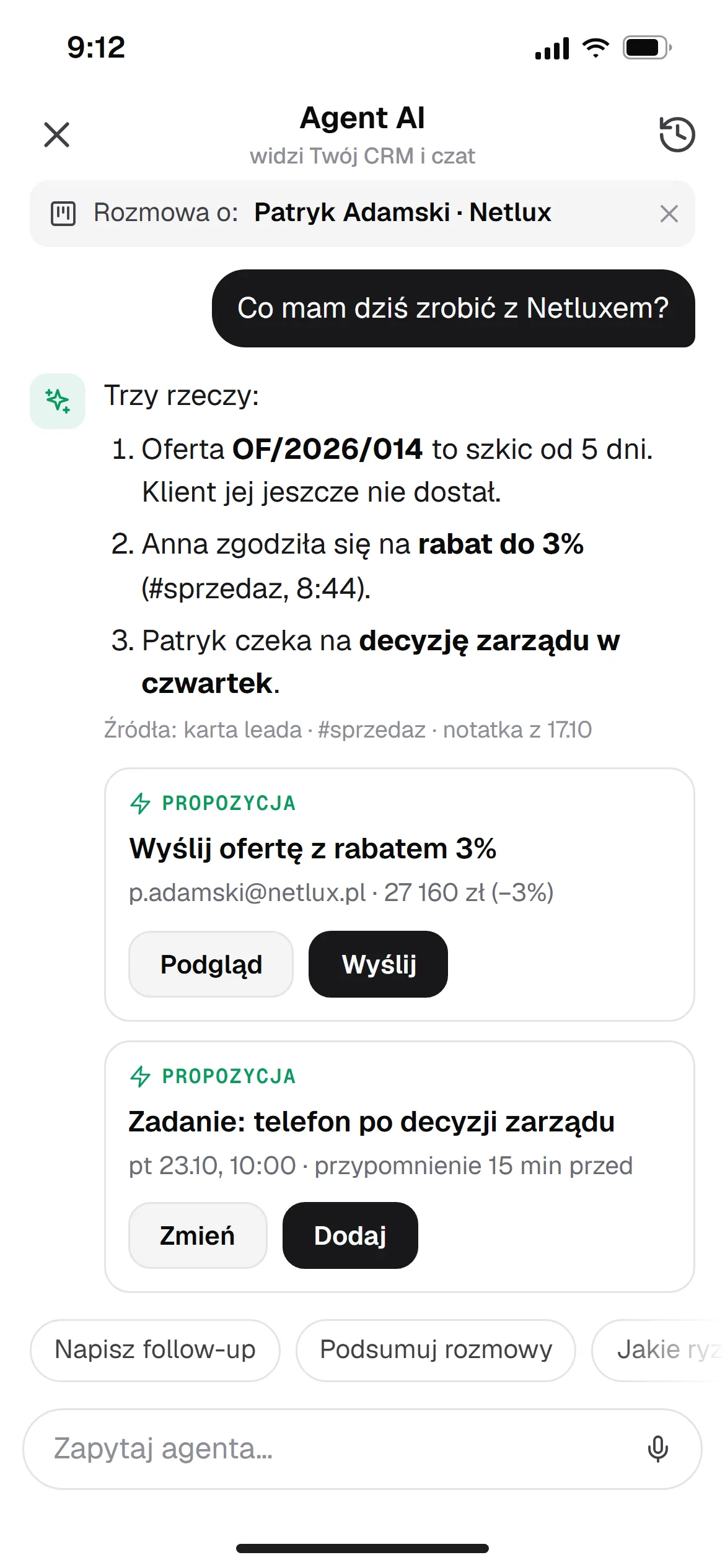
You type or speak, and the agent searches, prepares and updates data in the CRM. It shows every change as a plan to approve first, and you can undo completed steps with one click.
It works within your permissions. Deleting and sending always wait for your confirmation.
Your data and the AI models run on our own infrastructure, without being passed to external AI providers.
Every AI feature uses the same client card. Nothing reaches the client without your approval.
The agent flags what needs your attention: after a call, when an offer is about to expire, after a missed call, and for neglected and new leads.
JSON Meet transcribes the meeting, and a note with next steps lands on the lead by itself. The analysis gives a score, objections, buying signals and one tip for the next conversation. See →
“Summarise the sales status” turns calls and correspondence into the client’s attitude, risks and next steps.
A draft offer from your catalogue based on the lead’s history. You refine it in the builder and send it when it’s ready.
The agent prepares an automation rule, and you switch it on after reviewing it. Save a repeated command as a skill and run it with one sentence.
AI is billed in credits. You set budgets per company, person and feature, and the administrator sees the agent’s activity history.
Call analysis
JSON Meet transcribes the conversation, and the transcript and analysis land on the lead. On the call timeline you see buying signals and objections, you search the transcript by keyword, and the score points to one thing to improve in your next call. Items marked Coming soon are in the works.
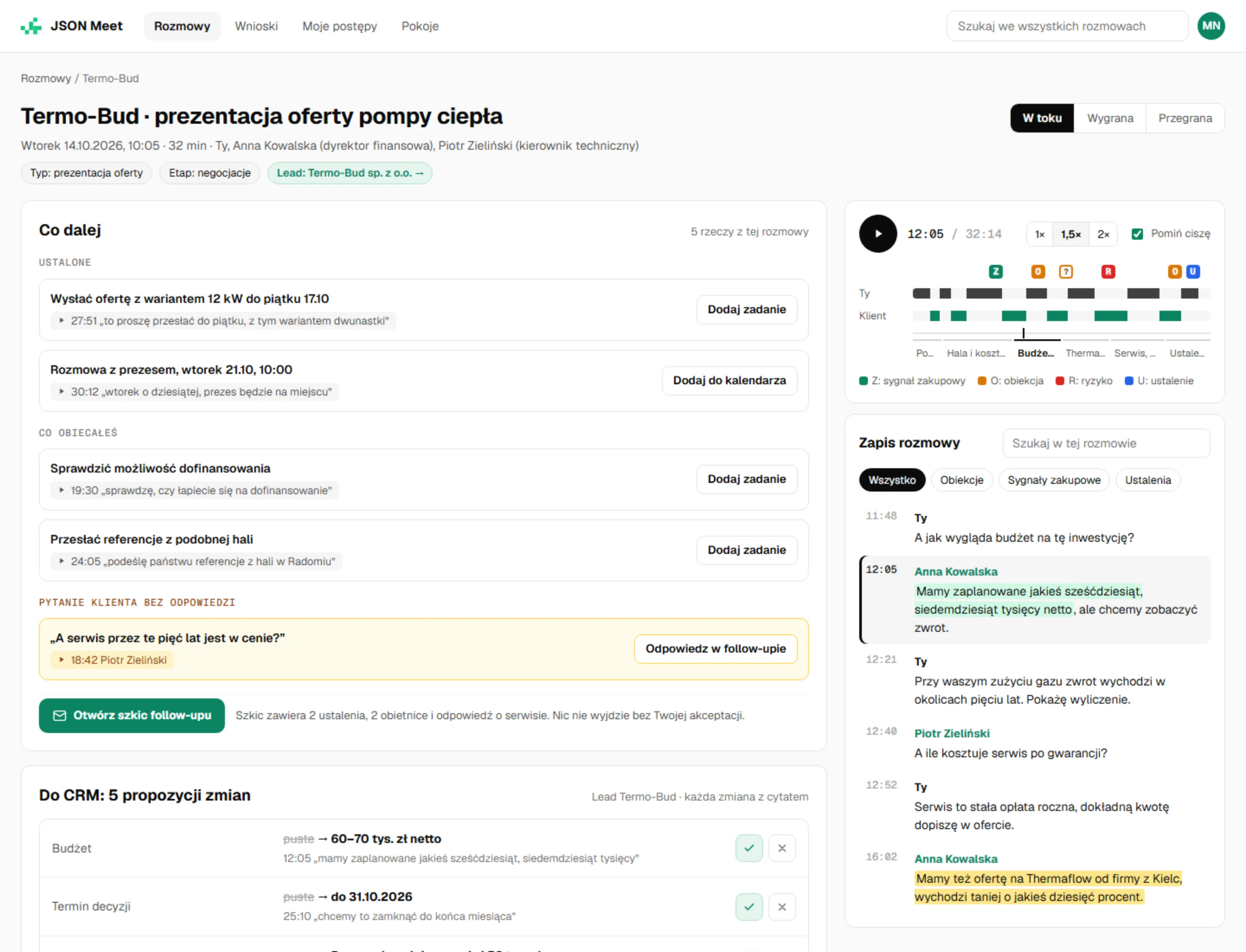
Swipe the screenshot sideways to see the whole screen.
To CRM Coming soon
Budget, decision date, decision-maker, competitors and changes to the offer land on the lead card as suggestions. Each has a quote and the minute of the call, so you know where it came from. You approve them with one button.
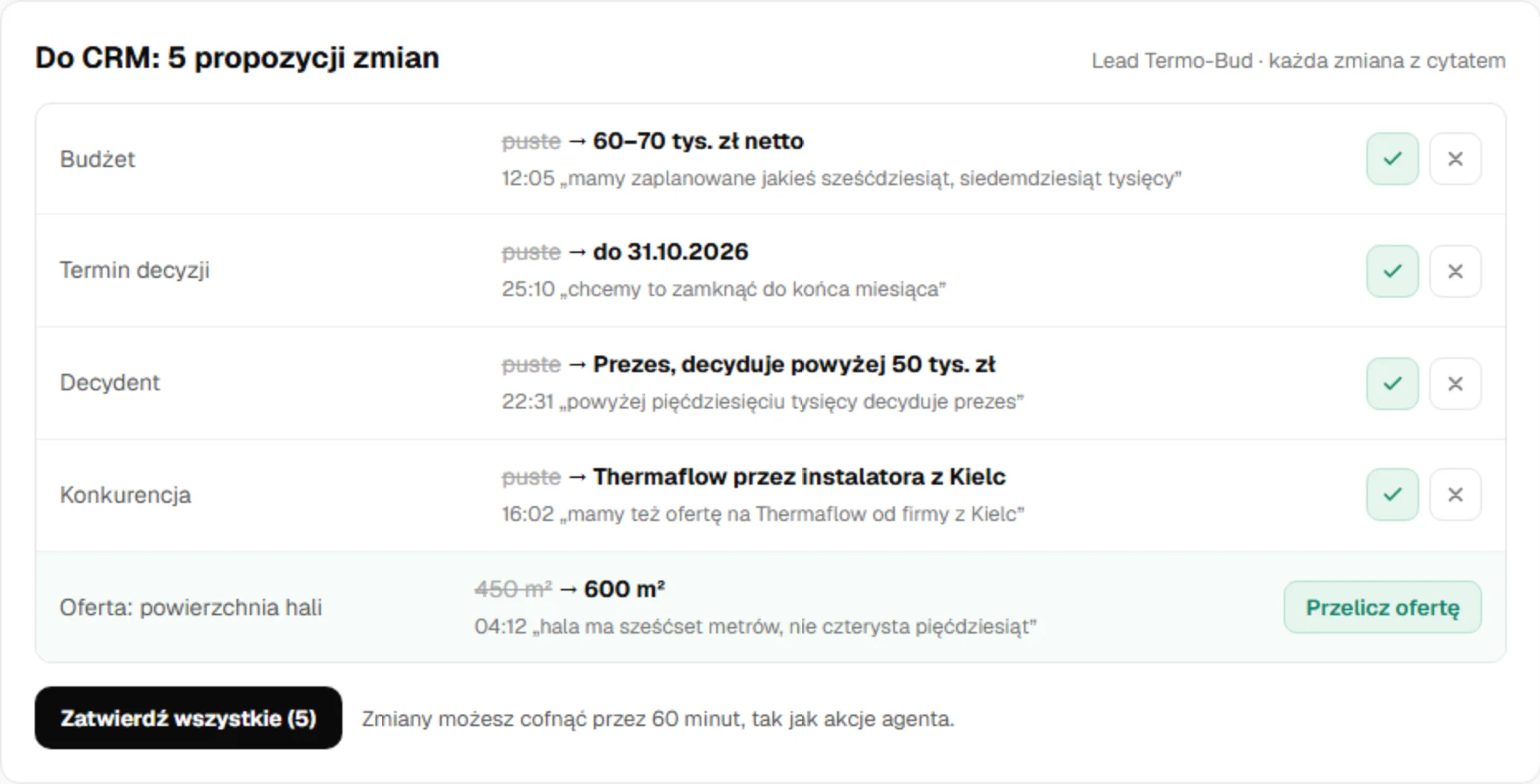
Score and coach
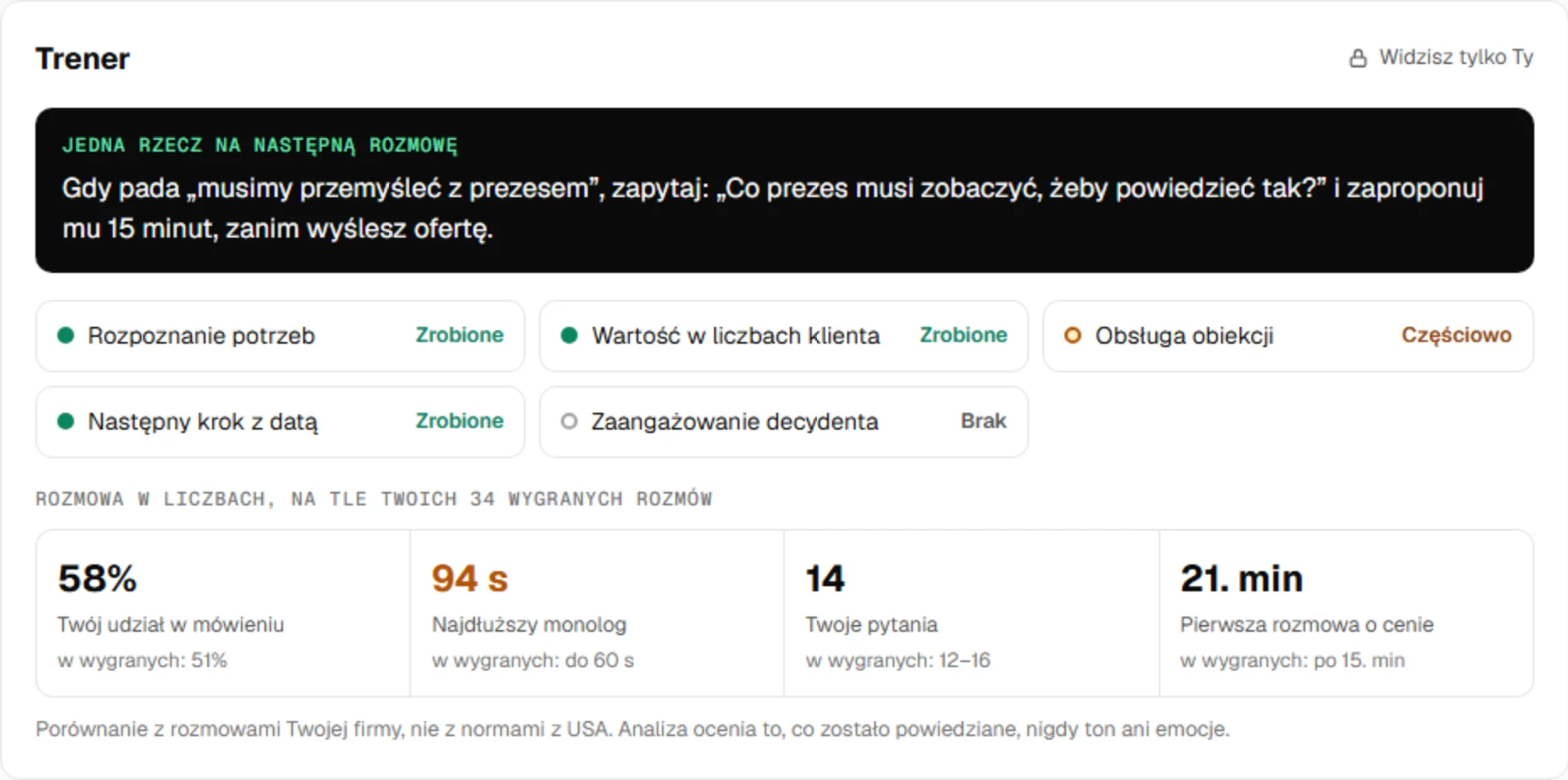
The score shows criteria with quotes from the call, strengths and what to improve, and ends with one specific tip for the next conversation. You set the scoring criteria and tracked topics for your company, and in “My progress” you see how your calls are changing.
On your phone Coming soon
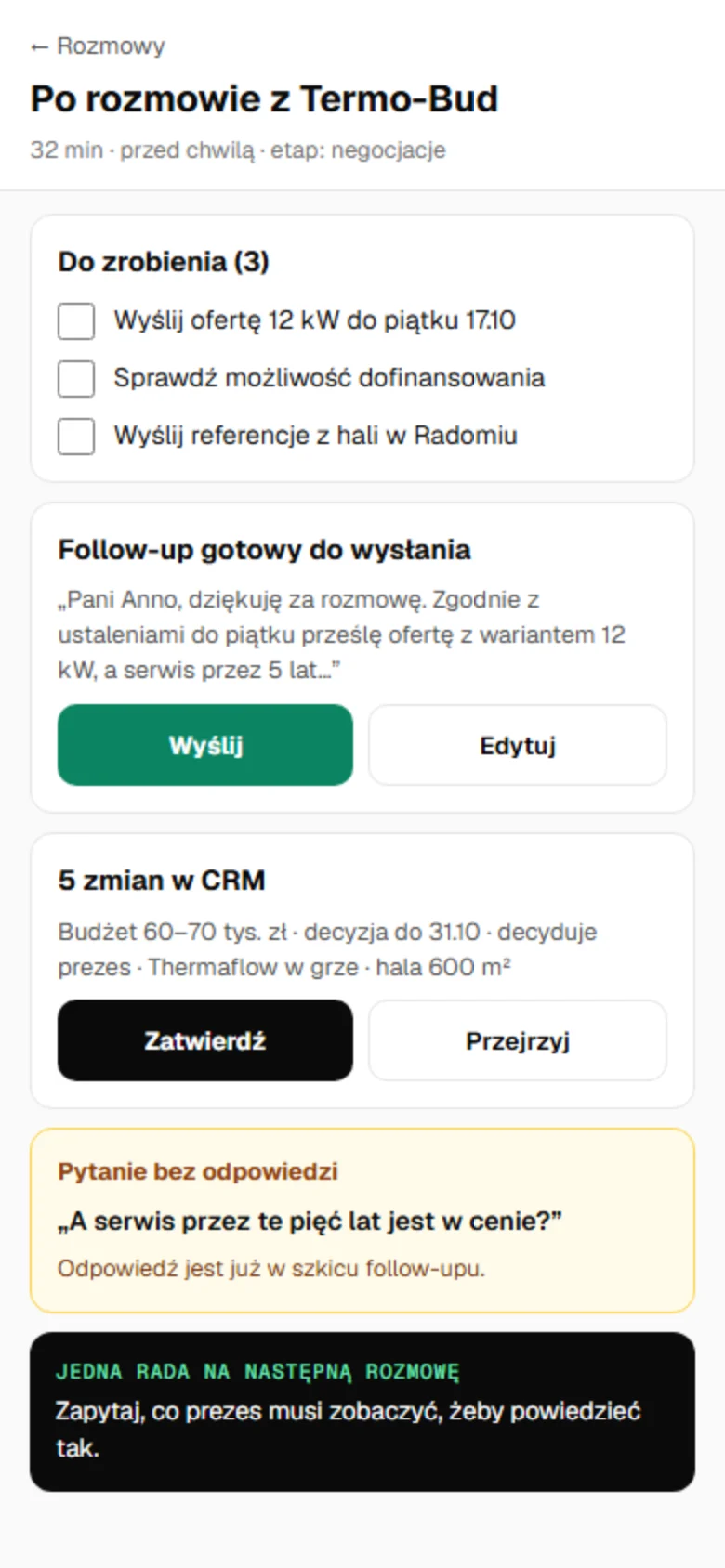
Right after the call your phone shows a to-do list, a ready follow-up with a “Send” button, CRM changes to approve, the client question you need to answer, and one tip for the next conversation.
Call insights Coming soon
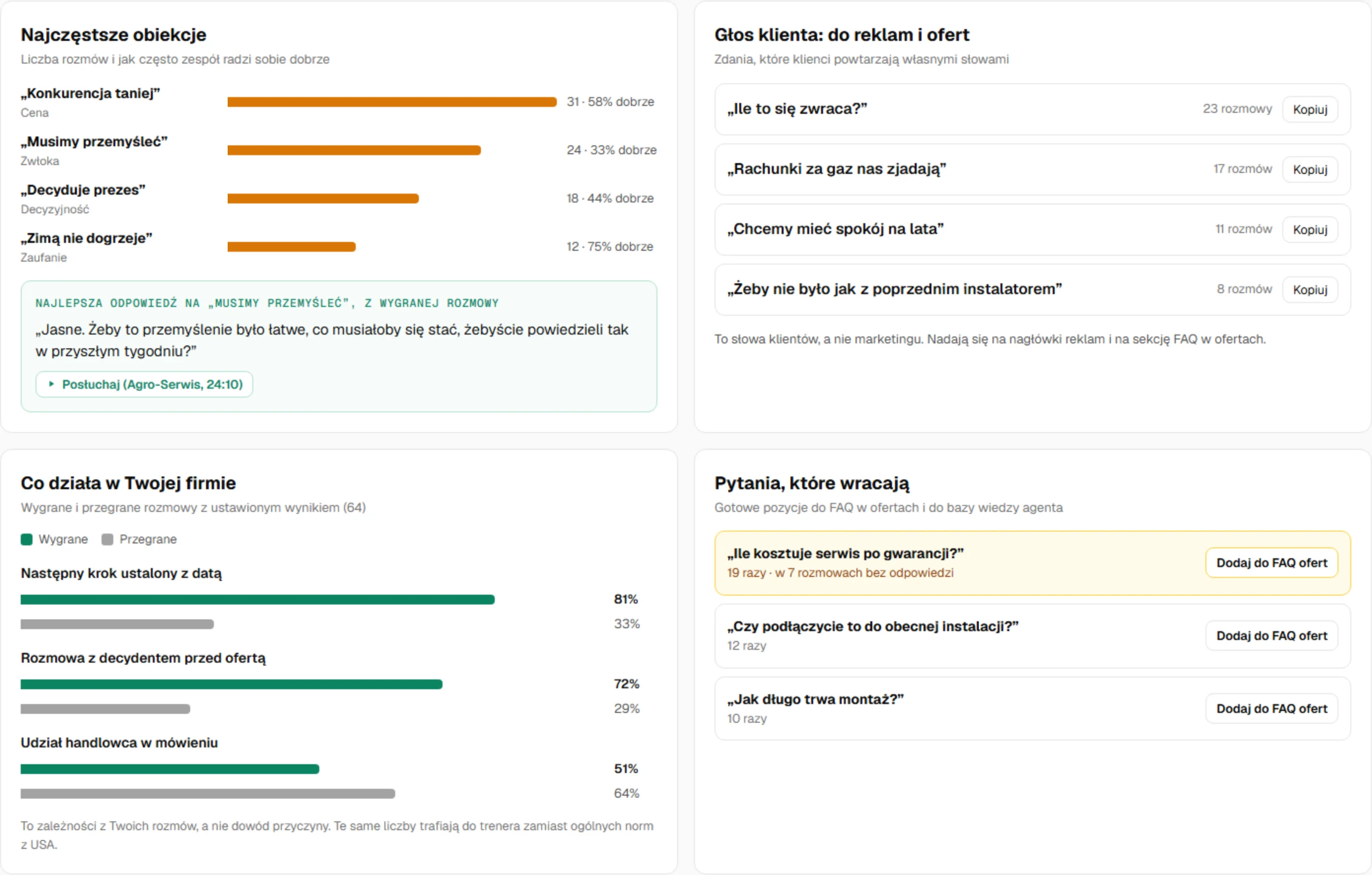
Many calls reveal what one call can’t: the most common objections and how the team handles them, the answer that worked in a won deal, clients’ own words for ads and offers, and deals that need rescuing.
Meetings, transcripts and analyses land on the same client card as offers and phone calls.
You can also upload calls from outside JSON Meet, such as phone calls, for analysis. Meetings and team chat are included in every plan, and transcription and analysis are billed in credits. Screens show sample data.
Phone
Install the panel like an app on your phone and computer, with My Day and Ask the agent shortcuts. Call straight from the panel and record the outcome and next step as soon as you hang up.
Security
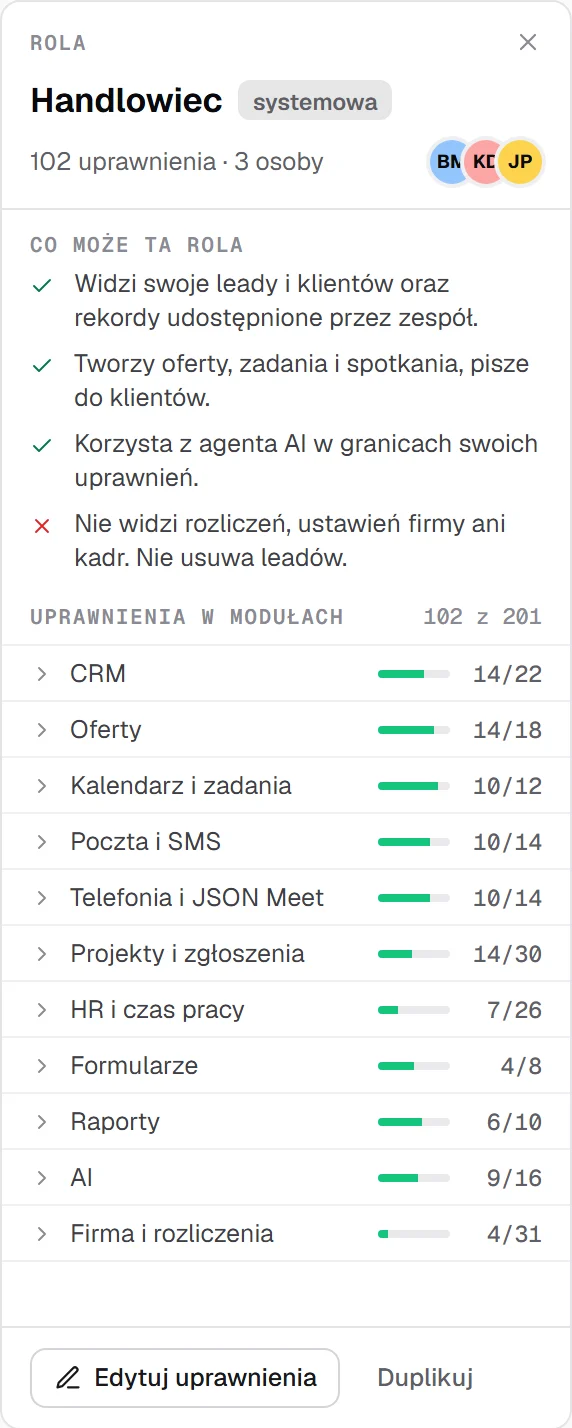
Everyone has their own account with two-step verification, and roles are described in plain sentences. A salesperson won't see payroll, and someone in HR doesn't need to see the pipeline.
Pricing
You don't pay for every seat: a plan covers the whole company, all modules and the same support, and plans differ only in team size and included credits. SMS, calls and AI features are billed by actual usage. Pay for a year up front and save 15–22%.
Team plan: $125 net per month for the whole company, about $10 per person. With annual billing $97 per month.
$69net / month
$55 / month with annual billing
2,000 credits every month
Try for free$125net / month
$97 / month with annual billing
5,000 credits every month
Try for free$159net / month
$132 / month with annual billing
7,500 credits every month
Try for free$269net / month
$229 / month with annual billing
15,000 credits every month
Try for freefrom $549net / month
Custom quote with annual billing
Credits as agreed
Talk to a representativeNet prices for the whole company. Pay by card, monthly or yearly up front. We count the people who log in to JSON Hub; clients and meeting guests are not counted.
Included credits are a monthly allowance for SMS, calls and AI features such as call analysis and the agent. If you run out, top up from $15, and you set the spending limit yourself. Current rates are shown in the panel; billing rules are set out in the terms of service.
Want help with onboarding or have more questions? The JSON Crew team will set up your processes, branded offers and automations, move your data from your current CRM and train your team.
FAQ
Can't find your question? Write to contact@jsoncrew.com and a JSON Crew representative will reply.
A salesperson starts the day on one screen, My Day, and does most of the work from there. On every screen the ? button opens that screen's guide in the Knowledge Center, and a first-steps wizard walks you through setting up your company. If you turn on the AI agent, it will tell you where to click.
You start with leads and offers, so you can send your first offer on day one. You switch on the other modules later. You can set everything up yourselves or with the JSON Crew team, who will configure your processes, offers and automations for you. We discuss the scope of that onboarding on a call.
You get a 30-day trial on your own data. You create the account without a card and only add one when the trial ends. If you don't choose a plan, the account switches to read-only, and full access comes back as soon as you choose one.
No. The price is for the whole company, and plans differ by team size: Start up to 5, Team up to 15, Business up to 50, Growth up to 100, and Enterprise above 100 people. We only count people who log in to JSON Hub. Every plan includes all modules.
The AI agent, call analysis and lead company classification are billed in credits by actual usage. Every plan includes credits each month, and you set the spending limit yourself. Current rates are shown in the panel; billing rules are set out in the terms of service.
We store data in the European Union. Data and AI models run on our own infrastructure, with nothing passed to external AI providers.
No. The offer opens from a link in the browser. The client sees how long the offer is still valid and accepts it with the “I accept the offer” button. Online payment after acceptance (BLIK, bank transfer, deposit) is the “Payment gateway” add-on. A JSON Crew representative will quote it after a short call.
You can import leads yourself from a CSV file. We can also move your data for you: clients, contacts, deals with their stages, notes, tasks and products. We go through the details of the switch on a call.
No. Invoices stay in your accounting software. JSON Hub runs sales from the first enquiry to offer acceptance, and then the project and the team.
Yes. You install the panel like an app on your phone and computer, straight from the browser. It has My Day and Ask the agent shortcuts.
Create an account without a card and start working on your own data right away.
Prefer to talk? Book a presentation with a JSON Crew representative.